class: center, middle, inverse, title-slide # A Primer on R Markdown ### <span style="font-lighter:bold;font-size:1em">Joshua D. Barillas</span><br /> <span style="font-weight:lighter;font-size:1em">Manager, Data Analysis - AACSB International</span><br /> 2019-06-25 <span class="citation">@Tampa</span> R User Group<br /> <br /> <a href="https://www.linkedin.com/in/jdbarillas/"><svg style="height:36pt;fill:#41717a;" viewBox="0 0 448 512"><path d="M416 32H31.9C14.3 32 0 46.5 0 64.3v383.4C0 465.5 14.3 480 31.9 480H416c17.6 0 32-14.5 32-32.3V64.3c0-17.8-14.4-32.3-32-32.3zM135.4 416H69V202.2h66.5V416zm-33.2-243c-21.3 0-38.5-17.3-38.5-38.5S80.9 96 102.2 96c21.2 0 38.5 17.3 38.5 38.5 0 21.3-17.2 38.5-38.5 38.5zm282.1 243h-66.4V312c0-24.8-.5-56.7-34.5-56.7-34.6 0-39.9 27-39.9 54.9V416h-66.4V202.2h63.7v29.2h.9c8.9-16.8 30.6-34.5 62.9-34.5 67.2 0 79.7 44.3 79.7 101.9V416z"/></svg></a> <a href="https://github.com/jdbarillas"><svg style="height:36pt;fill:#41717a;" viewBox="0 0 448 512"><path d="M400 32H48C21.5 32 0 53.5 0 80v352c0 26.5 21.5 48 48 48h352c26.5 0 48-21.5 48-48V80c0-26.5-21.5-48-48-48zM277.3 415.7c-8.4 1.5-11.5-3.7-11.5-8 0-5.4.2-33 .2-55.3 0-15.6-5.2-25.5-11.3-30.7 37-4.1 76-9.2 76-73.1 0-18.2-6.5-27.3-17.1-39 1.7-4.3 7.4-22-1.7-45-13.9-4.3-45.7 17.9-45.7 17.9-13.2-3.7-27.5-5.6-41.6-5.6-14.1 0-28.4 1.9-41.6 5.6 0 0-31.8-22.2-45.7-17.9-9.1 22.9-3.5 40.6-1.7 45-10.6 11.7-15.6 20.8-15.6 39 0 63.6 37.3 69 74.3 73.1-4.8 4.3-9.1 11.7-10.6 22.3-9.5 4.3-33.8 11.7-48.3-13.9-9.1-15.8-25.5-17.1-25.5-17.1-16.2-.2-1.1 10.2-1.1 10.2 10.8 5 18.4 24.2 18.4 24.2 9.7 29.7 56.1 19.7 56.1 19.7 0 13.9.2 36.5.2 40.6 0 4.3-3 9.5-11.5 8-66-22.1-112.2-84.9-112.2-158.3 0-91.8 70.2-161.5 162-161.5S388 165.6 388 257.4c.1 73.4-44.7 136.3-110.7 158.3zm-98.1-61.1c-1.9.4-3.7-.4-3.9-1.7-.2-1.5 1.1-2.8 3-3.2 1.9-.2 3.7.6 3.9 1.9.3 1.3-1 2.6-3 3zm-9.5-.9c0 1.3-1.5 2.4-3.5 2.4-2.2.2-3.7-.9-3.7-2.4 0-1.3 1.5-2.4 3.5-2.4 1.9-.2 3.7.9 3.7 2.4zm-13.7-1.1c-.4 1.3-2.4 1.9-4.1 1.3-1.9-.4-3.2-1.9-2.8-3.2.4-1.3 2.4-1.9 4.1-1.5 2 .6 3.3 2.1 2.8 3.4zm-12.3-5.4c-.9 1.1-2.8.9-4.3-.6-1.5-1.3-1.9-3.2-.9-4.1.9-1.1 2.8-.9 4.3.6 1.3 1.3 1.8 3.3.9 4.1zm-9.1-9.1c-.9.6-2.6 0-3.7-1.5s-1.1-3.2 0-3.9c1.1-.9 2.8-.2 3.7 1.3 1.1 1.5 1.1 3.3 0 4.1zm-6.5-9.7c-.9.9-2.4.4-3.5-.6-1.1-1.3-1.3-2.8-.4-3.5.9-.9 2.4-.4 3.5.6 1.1 1.3 1.3 2.8.4 3.5zm-6.7-7.4c-.4.9-1.7 1.1-2.8.4-1.3-.6-1.9-1.7-1.5-2.6.4-.6 1.5-.9 2.8-.4 1.3.7 1.9 1.8 1.5 2.6z"/></svg></a> <a href="https://twitter.com/jdbarillas"><svg style="height:36pt;fill:#41717a;" viewBox="0 0 448 512"><path d="M400 32H48C21.5 32 0 53.5 0 80v352c0 26.5 21.5 48 48 48h352c26.5 0 48-21.5 48-48V80c0-26.5-21.5-48-48-48zm-48.9 158.8c.2 2.8.2 5.7.2 8.5 0 86.7-66 186.6-186.6 186.6-37.2 0-71.7-10.8-100.7-29.4 5.3.6 10.4.8 15.8.8 30.7 0 58.9-10.4 81.4-28-28.8-.6-53-19.5-61.3-45.5 10.1 1.5 19.2 1.5 29.6-1.2-30-6.1-52.5-32.5-52.5-64.4v-.8c8.7 4.9 18.9 7.9 29.6 8.3a65.447 65.447 0 0 1-29.2-54.6c0-12.2 3.2-23.4 8.9-33.1 32.3 39.8 80.8 65.8 135.2 68.6-9.3-44.5 24-80.6 64-80.6 18.9 0 35.9 7.9 47.9 20.7 14.8-2.8 29-8.3 41.6-15.8-4.9 15.2-15.2 28-28.8 36.1 13.2-1.4 26-5.1 37.8-10.2-8.9 13.1-20.1 24.7-32.9 34z"/></svg></a> --- # R Markdown .left-column[ Plain text file with 3 types of content: - YAML header surrounded by `---` - Text in markdown - Code chunks surrounded by ``` ] .right-column[ 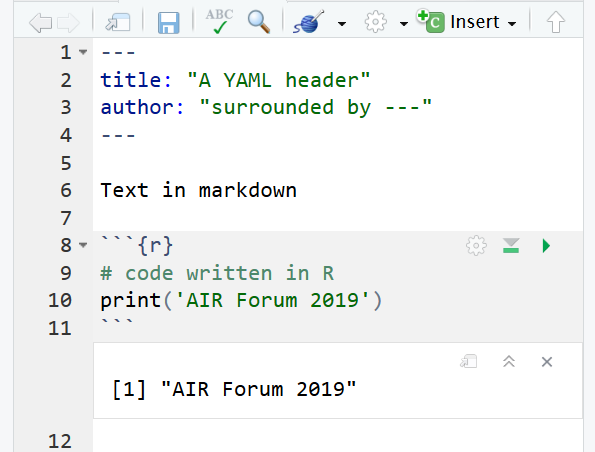 ] --- # Why Should I Care? .center[ ### Old Path ] .right-column[ .pull-left[ .center[ Query <svg style="height:24pt;fill:black;" viewBox="0 0 448 512"><path d="M413.1 222.5l22.2 22.2c9.4 9.4 9.4 24.6 0 33.9L241 473c-9.4 9.4-24.6 9.4-33.9 0L12.7 278.6c-9.4-9.4-9.4-24.6 0-33.9l22.2-22.2c9.5-9.5 25-9.3 34.3.4L184 343.4V56c0-13.3 10.7-24 24-24h32c13.3 0 24 10.7 24 24v287.4l114.8-120.5c9.3-9.8 24.8-10 34.3-.4z"/></svg> Analyze <svg style="height:24pt;fill:black;" viewBox="0 0 448 512"><path d="M413.1 222.5l22.2 22.2c9.4 9.4 9.4 24.6 0 33.9L241 473c-9.4 9.4-24.6 9.4-33.9 0L12.7 278.6c-9.4-9.4-9.4-24.6 0-33.9l22.2-22.2c9.5-9.5 25-9.3 34.3.4L184 343.4V56c0-13.3 10.7-24 24-24h32c13.3 0 24 10.7 24 24v287.4l114.8-120.5c9.3-9.8 24.8-10 34.3-.4z"/></svg> Graphics <svg style="height:24pt;fill:black;" viewBox="0 0 448 512"><path d="M413.1 222.5l22.2 22.2c9.4 9.4 9.4 24.6 0 33.9L241 473c-9.4 9.4-24.6 9.4-33.9 0L12.7 278.6c-9.4-9.4-9.4-24.6 0-33.9l22.2-22.2c9.5-9.5 25-9.3 34.3.4L184 343.4V56c0-13.3 10.7-24 24-24h32c13.3 0 24 10.7 24 24v287.4l114.8-120.5c9.3-9.8 24.8-10 34.3-.4z"/></svg> Report ] ] .pull-right[ .left[     ] ] ] .left-column[ Problems with method: * Time consuming * Copy/pasting (likelyhood of errors<svg style="height:16pt;fill:#777;" viewBox="0 0 448 512"><path d="M34.9 289.5l-22.2-22.2c-9.4-9.4-9.4-24.6 0-33.9L207 39c9.4-9.4 24.6-9.4 33.9 0l194.3 194.3c9.4 9.4 9.4 24.6 0 33.9L413 289.4c-9.5 9.5-25 9.3-34.3-.4L264 168.6V456c0 13.3-10.7 24-24 24h-32c-13.3 0-24-10.7-24-24V168.6L69.2 289.1c-9.3 9.8-24.8 10-34.3.4z"/></svg>) * Requires multiple staff/applications ] --- # Most Important .pull-left[ [](https://bookdown.org/yihui/rmarkdown/) ] .pull-right[[](https://www.rstudio.com/resources/cheatsheets/#rmarkdown) ] --- # Reproducible Workflow using R Markdown .left-column[ R Markdown Combines: * Prose * Code * Results Output formats: * Web documents __`.html`__ * Static documents with LaTeX __`.pdf`__ * MS Word __`.docx`__ * Powerpoint __`.pptx`__ * EPUB __`.epub`__ ] .right-column[ .pull-left[ 1. Text in markdown: .center[Write \*\*what\*\* you want \*however\* you want] .center[<svg style="height:12pt;fill:black;" viewBox="0 0 448 512"><path d="M413.1 222.5l22.2 22.2c9.4 9.4 9.4 24.6 0 33.9L241 473c-9.4 9.4-24.6 9.4-33.9 0L12.7 278.6c-9.4-9.4-9.4-24.6 0-33.9l22.2-22.2c9.5-9.5 25-9.3 34.3.4L184 343.4V56c0-13.3 10.7-24 24-24h32c13.3 0 24 10.7 24 24v287.4l114.8-120.5c9.3-9.8 24.8-10 34.3-.4z"/></svg>] .center[Write __what__ you want _however_ you want] 2. Inline or Chunks of Code: .center[Today's date is \` `r Sys.Date()`\`] .center[<svg style="height:12pt;fill:black;" viewBox="0 0 448 512"><path d="M413.1 222.5l22.2 22.2c9.4 9.4 9.4 24.6 0 33.9L241 473c-9.4 9.4-24.6 9.4-33.9 0L12.7 278.6c-9.4-9.4-9.4-24.6 0-33.9l22.2-22.2c9.5-9.5 25-9.3 34.3.4L184 343.4V56c0-13.3 10.7-24 24-24h32c13.3 0 24 10.7 24 24v287.4l114.8-120.5c9.3-9.8 24.8-10 34.3-.4z"/></svg>] .center[Today's date is 2019-06-25] 3. Figures (*Outputs*): .center[ 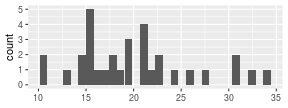<!-- --> ] ] .pull-right[ 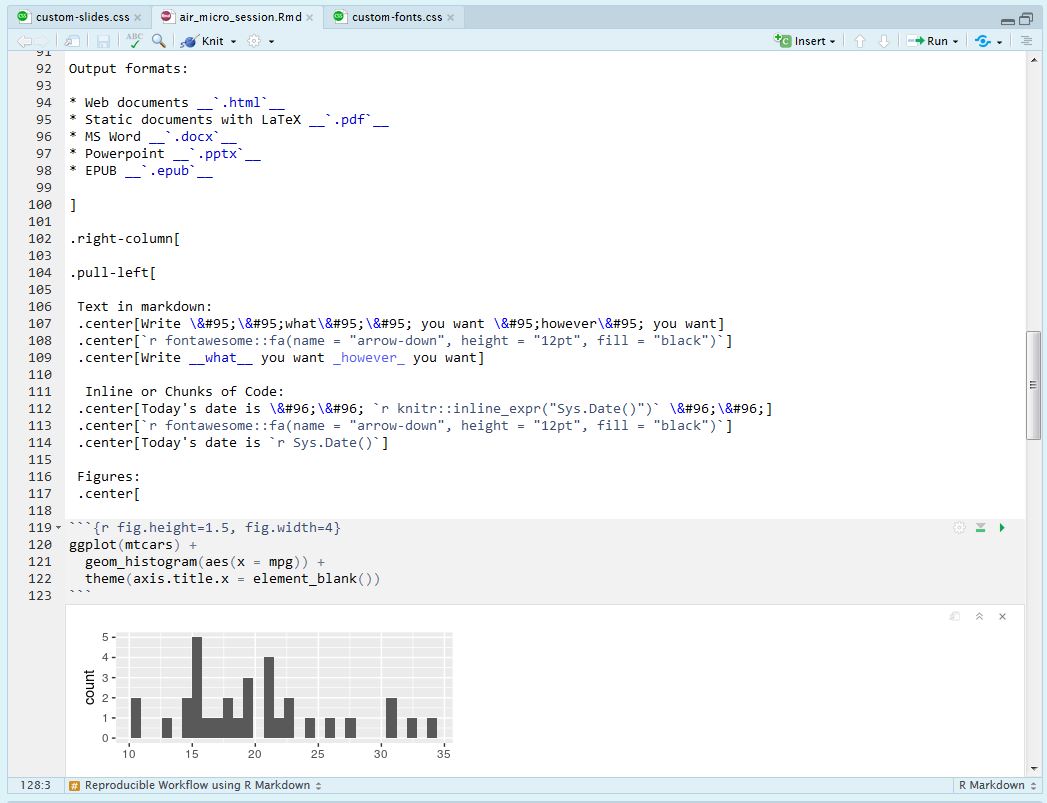 ] ] ??? Reproducible documents: If error discovered, or if additional data, can just re-compile the report and get new or corrected results. Versus having to reconstruct figures and tables, paste them into a Word document, and further hand-edit various detailed results. **LITERATE PROGRAMMING** --- # PDF .pull-left[  ] .pull-right[  ] ??? --- # HTML Documents  --- # Word Documents 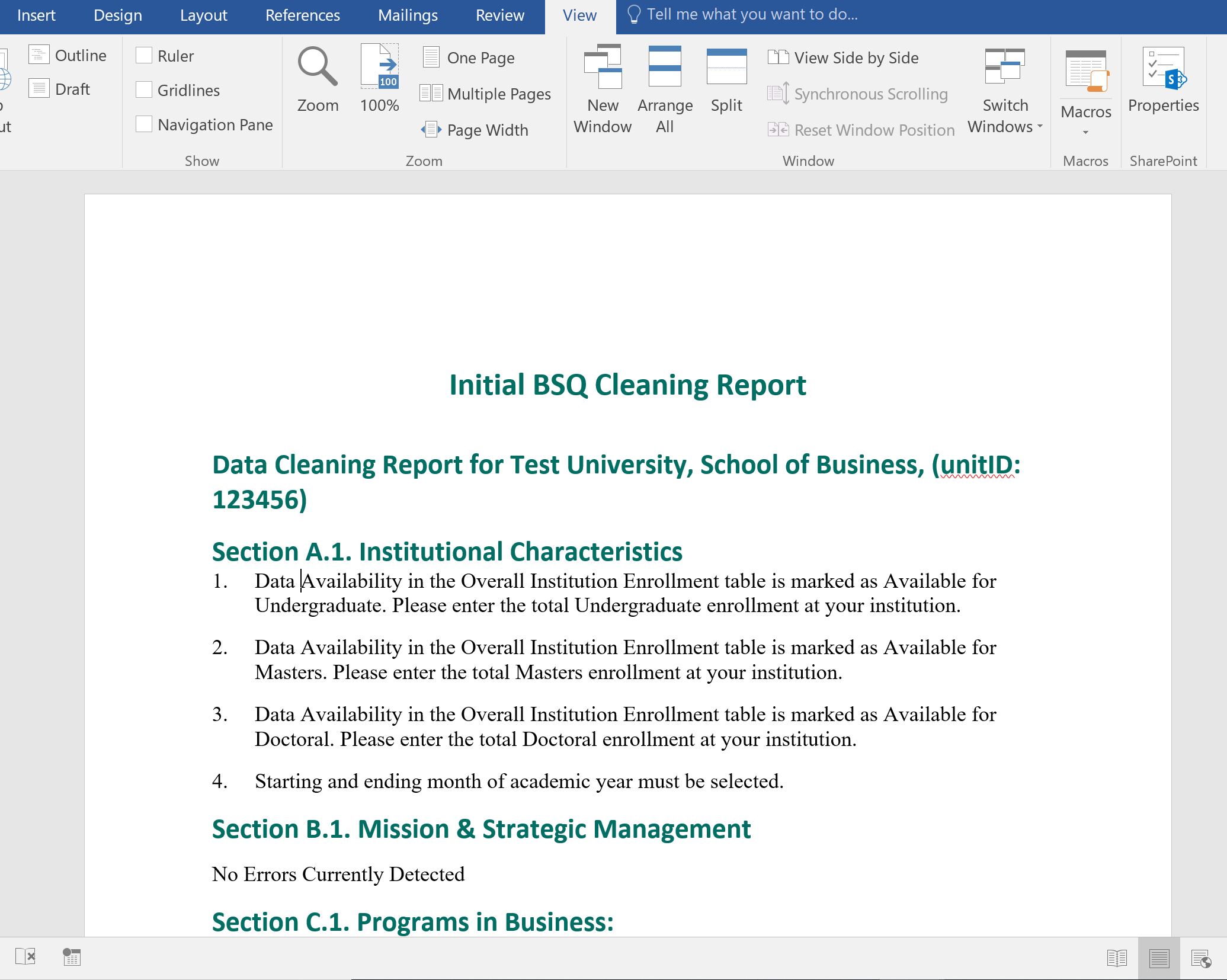 --- # Presentations 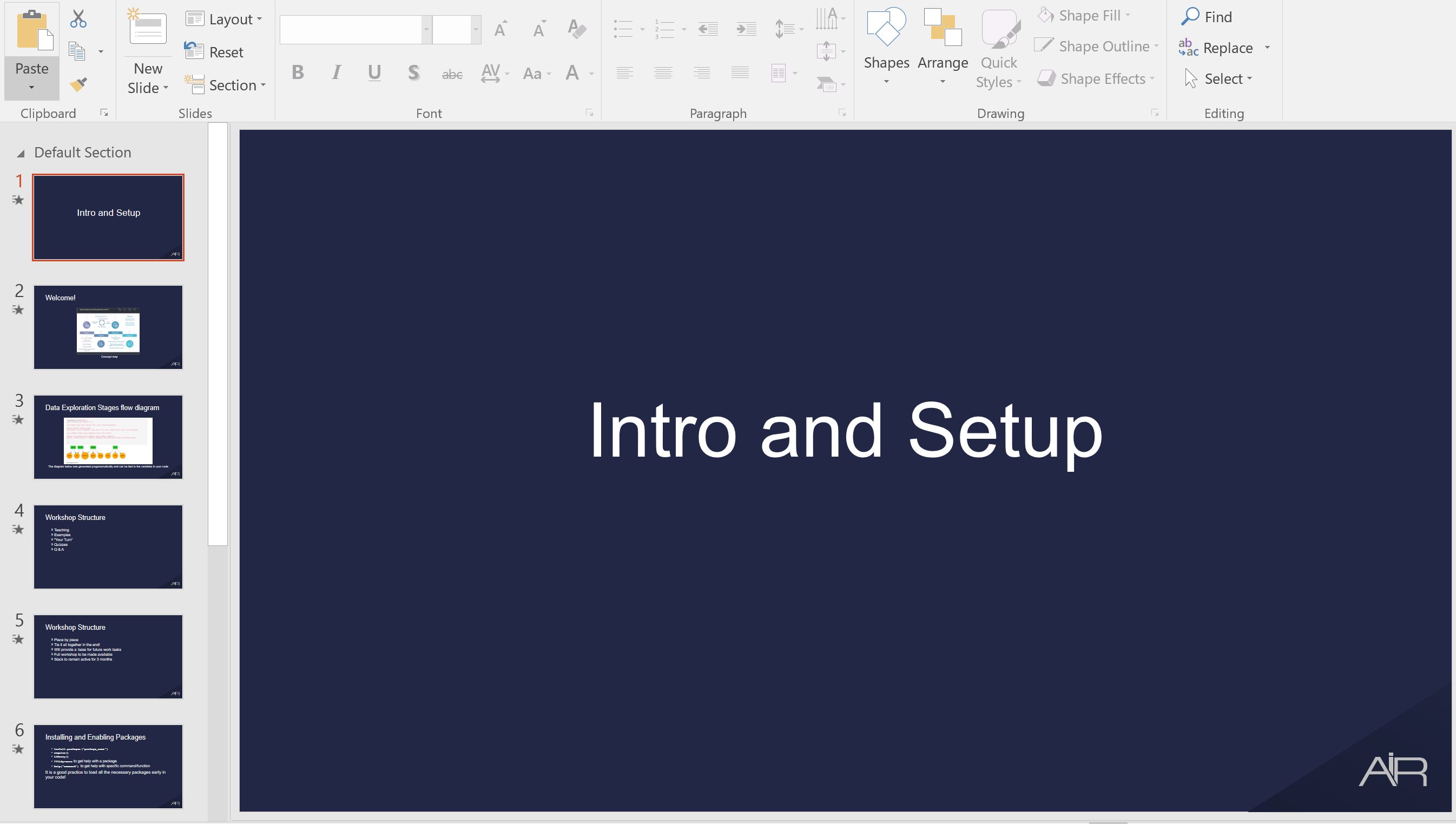 --- # Dashboards  --- # Tutorials 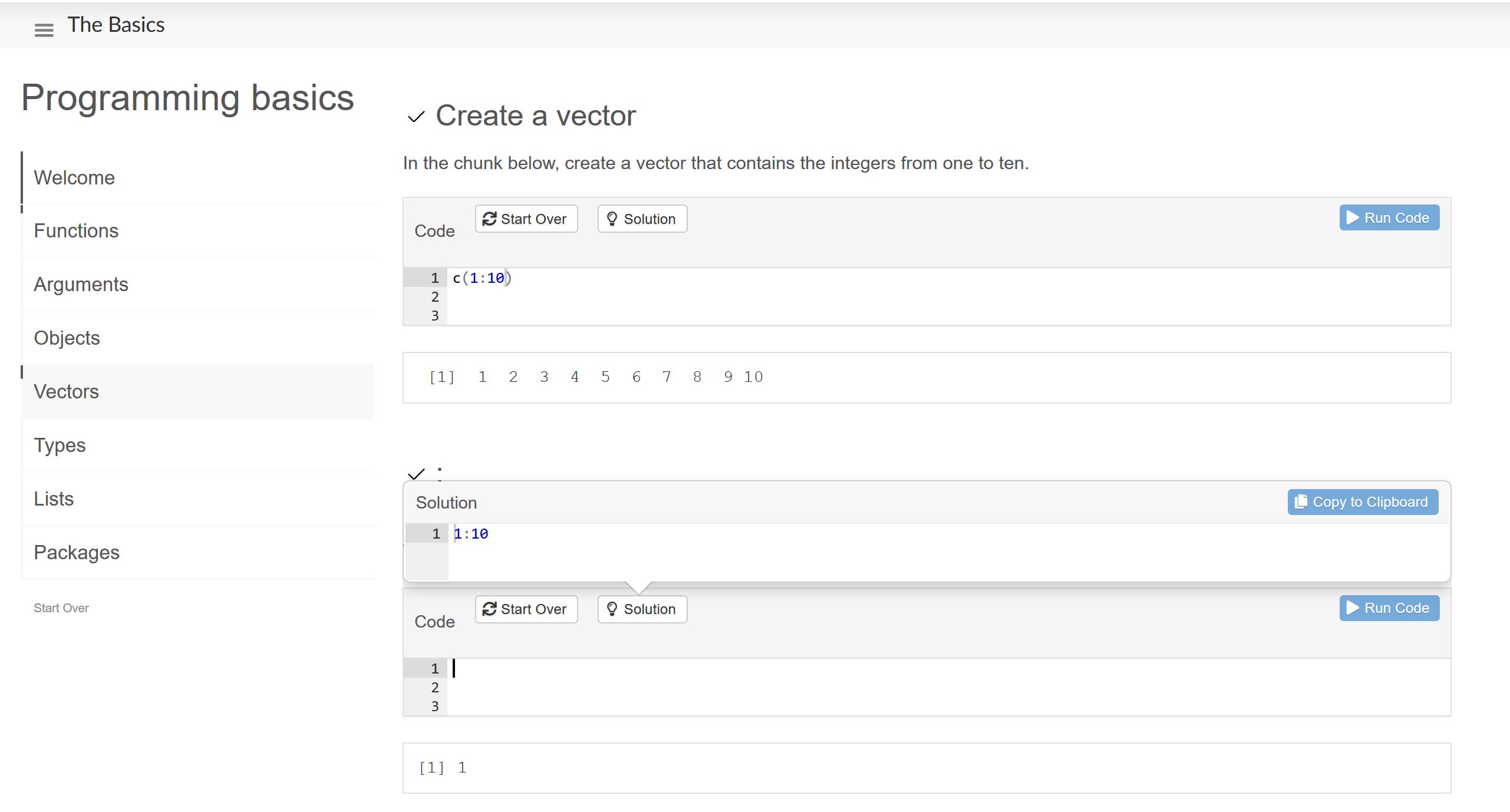 --- # Books .left-column[ [  ](https://bookdown.org/yihui/bookdown/) ] .right-column[ 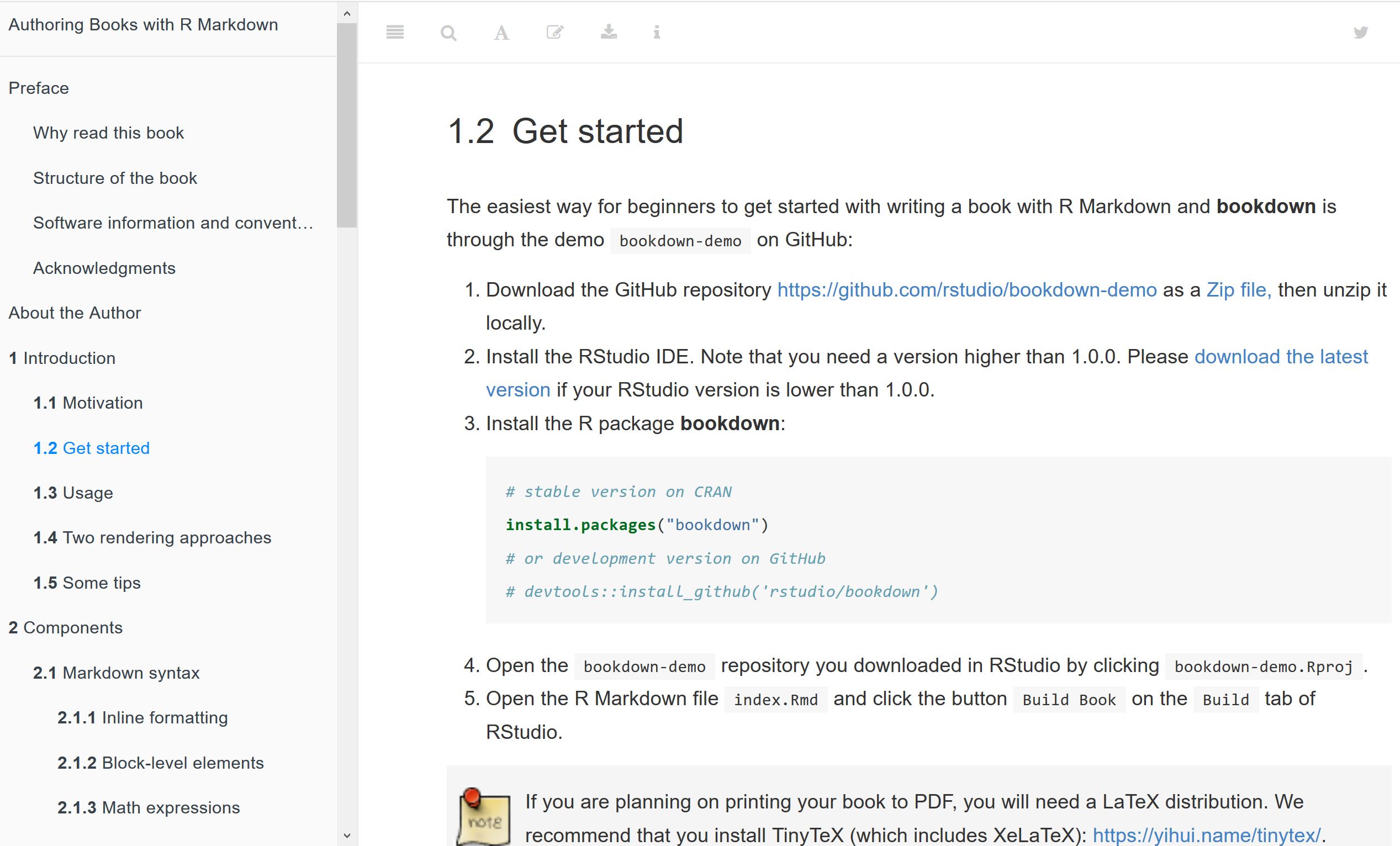 ] --- # Blogs .left-column[[](https://bookdown.org/yihui/blogdown/)] .right-column[[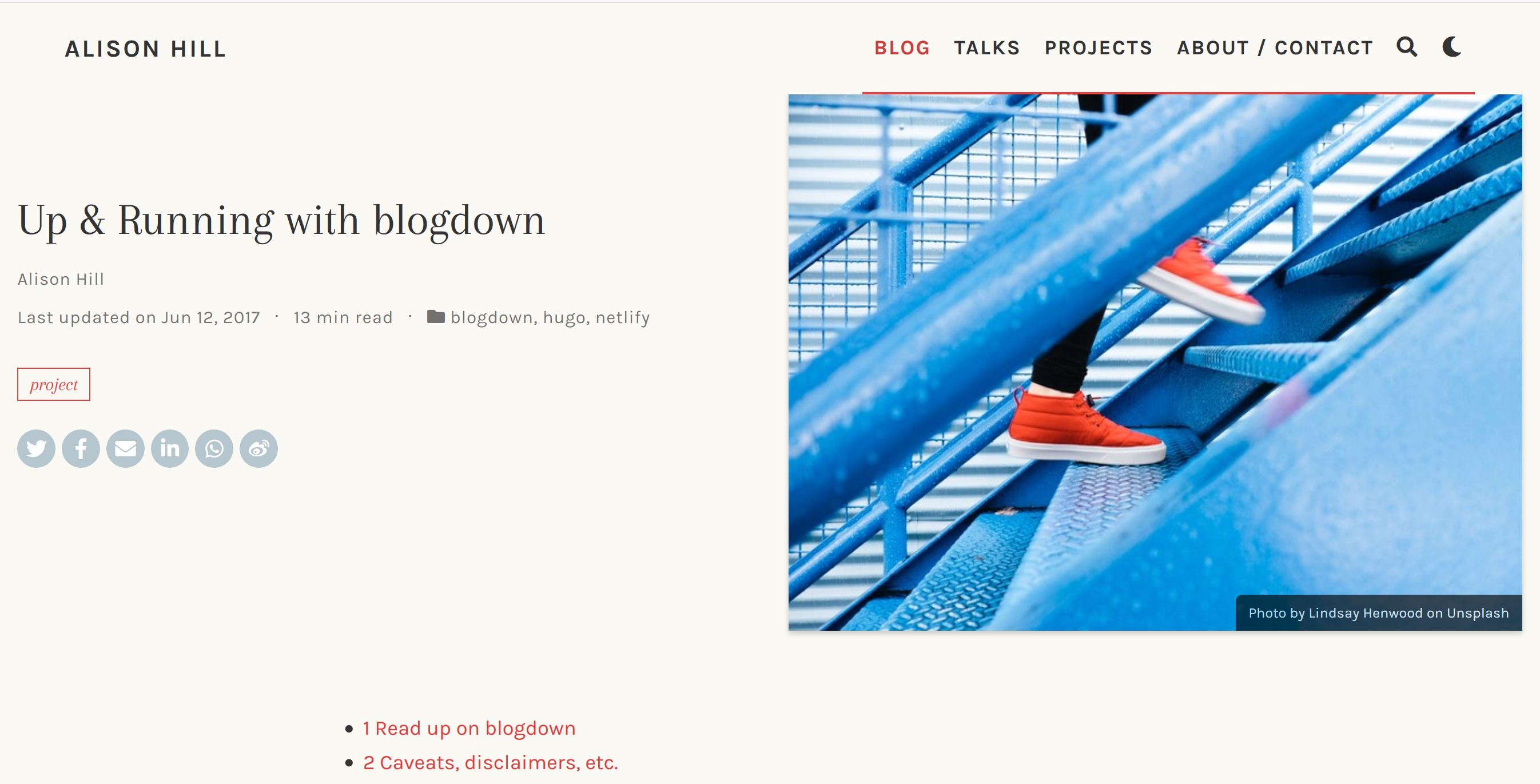](https://alison.rbind.io/post/2017-06-12-up-and-running-with-blogdown/)] --- # Paged HTML Documents .left-column[ Paginated HTML with R Markdown: [pagedown](https://github.com/rstudio/pagedown) Current templates include [JSS article, CV, letter, business cards](https://pagedown.rbind.io/#applications) ] .right-column[ .pull-left[  ] .pull-right[  ] ] ??? Uses Paged.js polyfill to implement CSS support R Markdown document, means all the advantages are available Most stable in Chrome browser Customizable using HTML/CSS: - add university design - work with marketing dept/webmaster - Combine the content creation and styling - Perfect for reports where styling does not change a lot (annual reports) --- class: middle, center # [Markdown](https://www.markdowntutorial.com/) --- layout:true class: middle, left --- # Headers 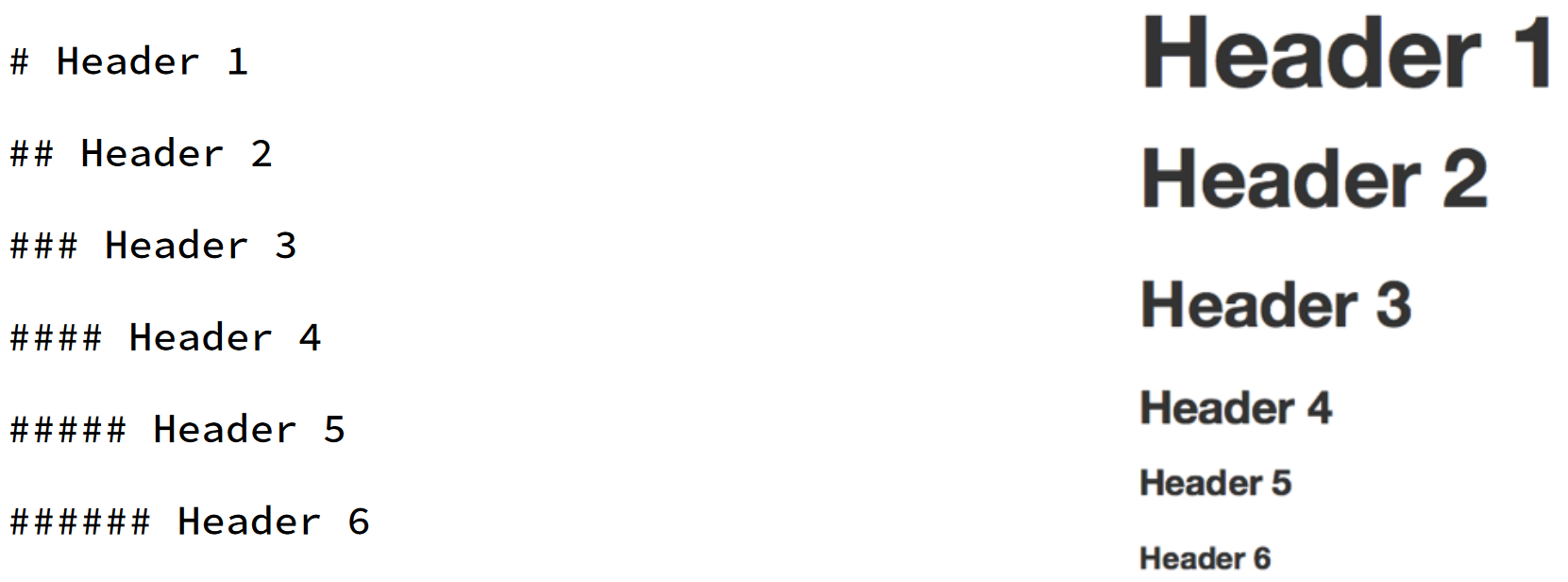 --- # Text 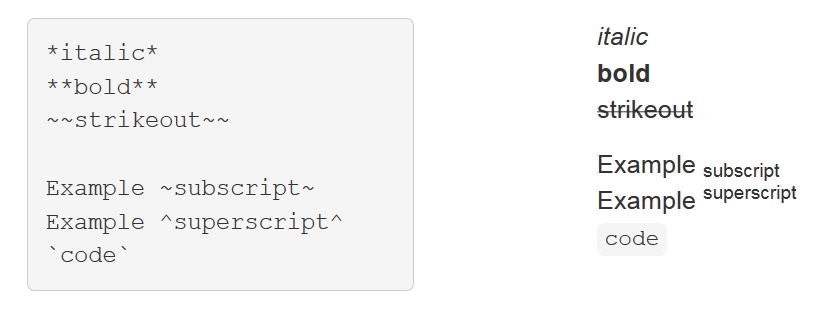 --- # Lists 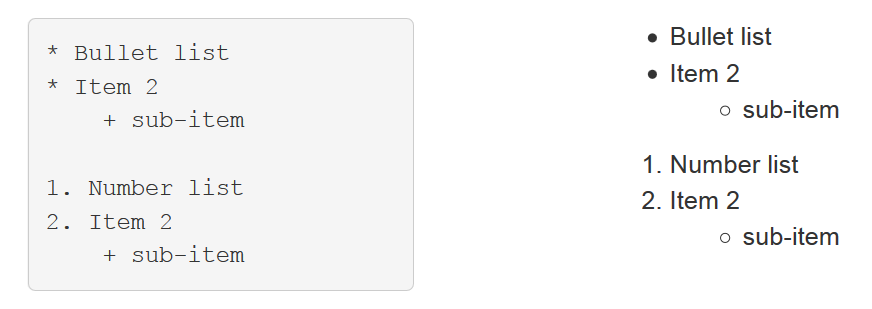 --- # Hyperlinks  --- # Images  --- # Math Expressions  --- # Math Equations  --- class: middle, center # Code --- # Inline Place code within a sentence with ` `r *code here*` `. R Markdown will replace the code with its results. For example, ` `r 87 + 78` ` will evaluate to 165 --- # Chunks Insert a "chunk" of R code using backticks and braces. 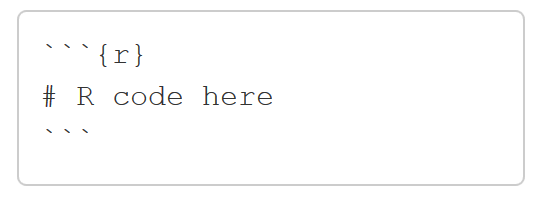 When the report is rendered, R Markdown will evaluate the code and include the results, while also removing the backticks and braces. Shortcut to Insert Chunk: * **Ctrl + Alt + I** (PC) * **Cmd + Option + I** (Mac) --- # Chunk Options  --- # echo = FALSE  --- # eval = FALSE  --- # include = FALSE  --- # fig.height/fig.width  --- # How it Works .center[] --- class: middle, center # Parameterized --- # YAML .pull-left[  ] .pull-right[  ] --- # Parameters 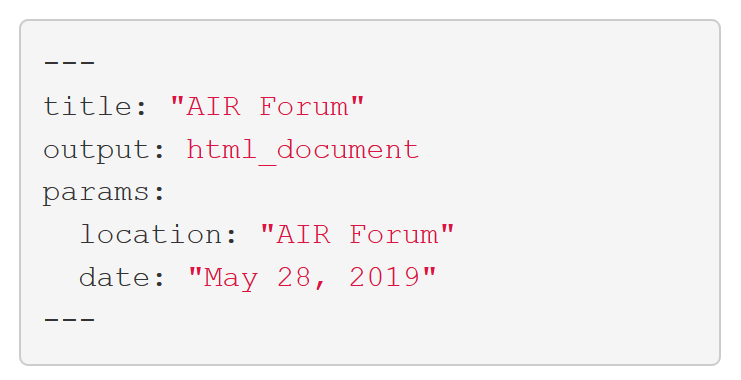 --- # Using Parameters ```yaml --- params: location: Southern Brewing date: !r format(Sys.Date(), "%B %d, %Y") --- Welcome to this workshop, given at `r params$location` on `r params$date`. ``` .center[<svg style="height:26pt;fill:black;" viewBox="0 0 448 512"><path d="M413.1 222.5l22.2 22.2c9.4 9.4 9.4 24.6 0 33.9L241 473c-9.4 9.4-24.6 9.4-33.9 0L12.7 278.6c-9.4-9.4-9.4-24.6 0-33.9l22.2-22.2c9.5-9.5 25-9.3 34.3.4L184 343.4V56c0-13.3 10.7-24 24-24h32c13.3 0 24 10.7 24 24v287.4l114.8-120.5c9.3-9.8 24.8-10 34.3-.4z"/></svg>] Welcome to this workshop, given at Southern Brewing on June 25, 2019. --- # render() Render at the command line with the default YAML options ```r library(rmarkdown) render("my-presentation.Rmd") ``` Render at the command line with set parameters ```r library(rmarkdown) render("my-presentation.Rmd", params = list(location = "USF", date = "August 5, 2019")) ``` --- # Things to Remember 1. Document is ran in a fresh R session using knitr, therefore all libraries used should be loaded *within the document* 2. Objects created in a code chunk are available to code in later chunks --- # Knitr is MULTI-Lingual * SQL * Python * SAS * [Many more](https://bookdown.org/yihui/rmarkdown/language-engines.html) --- # engine 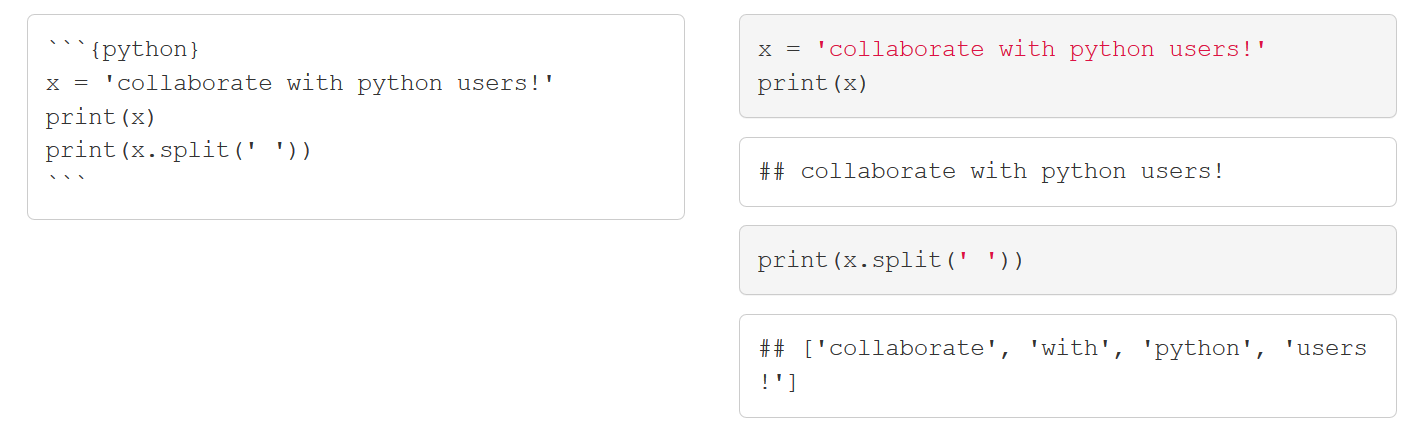 --- # Note for SAS  --- # Resources .pull-left[ [](https://bookdown.org/yihui/rmarkdown/) ] .pull-right[[](https://www.rstudio.com/resources/cheatsheets/#rmarkdown) ] --- class: left, middle # Reproducibility .left-column[ Everything is text so can take advantage through: - Copy/pasting code errors into search engines - Portability (minimal file size) - Version contol (git) ] .right-column[ 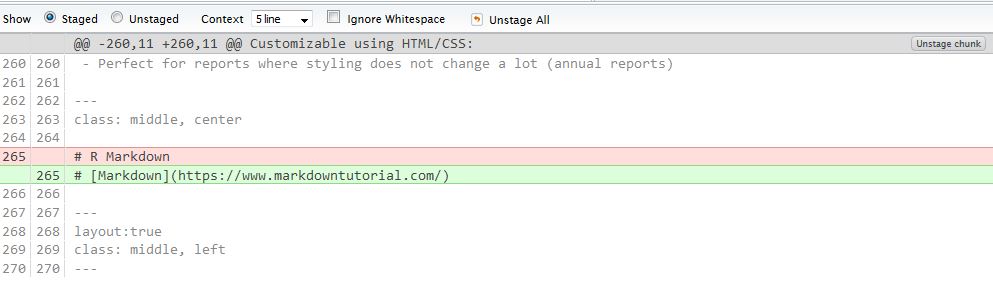 ] --- class: center, middle # Questions?